
Game Introduction
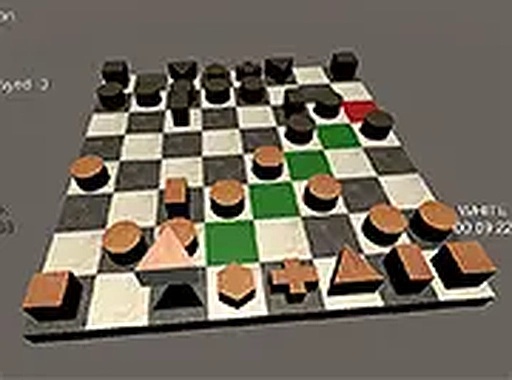
Chess Strategy: Dual View Board Game brings the classic board game of chess to your computer with a fresh visual twist. This digital version allows players to switch between a traditional top-down 2D perspective and a more immersive 3D view that gives the board and pieces a sense of depth. The core objective remains the same as standard chess: to outmaneuver your opponent and place their king in a position from which it cannot escape. The game follows all conventional chess rules, including special moves such as castling, en passant, and pawn promotion. Designed for two players sharing a single device, it is perfect for friendly matches at home or during breaks. Whether you are new to the game or an experienced strategist, this title offers a focused and distraction-free environment to enjoy the intellectual challenge of chess. With no advertisements or in-app purchases, players can concentrate fully on the game. The clean interface and smooth performance make it suitable for both quick sessions and longer, more thoughtful matches.
How to Play
To begin a game, two players sit together at the same computer. The game offers both mouse and keyboard controls for moving pieces. Before starting, players can choose between the 2D or 3D visual mode. Turns are taken alternately, with each player moving one of their pieces according to standard chess rules. To move a piece, you can click and drag it to the desired square, or click to select it and then click the target square. All standard chess moves are supported, including special actions like castling, en passant, and pawn promotion. The ultimate goal is to checkmate your opponent's king, meaning it is under attack and cannot escape capture. After each match, players can start a new round to continue improving their strategies and enjoy the competitive fun.
Game Features
The game includes two distinct visual modes: a classic 2D top-down view and an immersive 3D perspective that adds visual depth. It supports local two-player gameplay on a single computer, making it ideal for face-to-face matches. Controls are smooth and responsive, working with both mouse and keyboard inputs. The interface is clean and modern, designed to minimize distractions. All standard chess rules are implemented, including special moves such as castling, en passant, and pawn promotion. The game is free to play and contains no advertisements or in-app purchases, providing a pure chess experience. It is well-suited for both short, casual games and longer, more deliberate sessions, appealing to players of various skill levels.
Tips for Success
Focus on controlling the center of the board early in the game to give your pieces more room to move. Develop your knights and bishops before bringing out your queen. Consider castling early to protect your king and connect your rooks. Avoid moving the same piece multiple times during the opening phase. Practice regularly to recognize common patterns and tactical ideas. Learning basic checkmate patterns, such as using a king and queen together, can be very helpful. After each game, take a moment to review your moves and think about what you could have done differently. Patience and forward thinking are key to improving your overall strategy.





Comments
0 comments