Daily Edition
Neon Food Catch Skill Game

Neon Food Catch Skill Game

Coordination Timing Reflex
Developer: Nimbus Core Interactive
Published: 2024-11-18
Updated: 2026-06-27

Review

Neon Food Catch offers a simple yet engaging reflex challenge with its bright neon visuals and intuitive mouse controls. The core mechanic of catching falling food items is easy to pick up, but the timer adds pressure that keeps gameplay exciting. The inclusion of time extension clocks and a leaderboard encourages repeated play to improve scores. It is a perfect choice for short breaks or longer sessions, running smoothly in any desktop browser without downloads. The family-friendly design makes it suitable for all ages.

Full story

Game Introduction

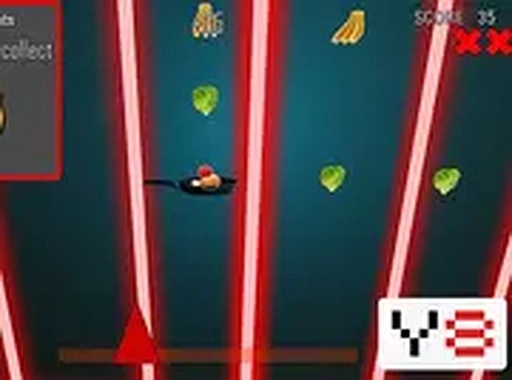
Neon Food Catch is a skill-based reflex game where players control a pan to catch falling food items. The core objective is to collect as many pieces as possible to increase your score. Special clocks appear during gameplay to add extra time, allowing longer sessions and higher scores. The game features a bright neon visual style that is easy on the eyes and suitable for players of all ages. Designed for desktop play, it runs smoothly in a browser without any downloads, making it a convenient choice for quick gaming sessions or extended play. The leaderboard encourages friendly competition by recording high scores, so players can track their progress and challenge others. The simple yet engaging mechanics make it accessible to beginners while still offering depth for experienced players to refine their timing and precision.

How to Play

To play Neon Food Catch, use your mouse to move the pan left and right at the bottom of the screen. Food items fall from the top, and you must position the pan directly under them to catch them. Each caught food piece adds to your score. Clocks appear occasionally; collecting them adds extra seconds to the countdown timer. The game ends when time runs out, so efficient catching and clock collection are key. The controls are intuitive: simply move your mouse to guide the pan. No complex button combinations are needed, making it easy for anyone to start playing immediately. The game may include a leaderboard where you can save your name and compare scores with friends.

Game Features

Neon Food Catch includes bright neon visuals that create a visually appealing and easy-to-see interface. The game uses simple mouse controls, requiring only left-right movement. Time extension clocks appear periodically to add extra seconds to the timer, allowing longer gameplay sessions. A global leaderboard may be available for players to save their high scores and compare with others. The game is designed for desktop browsers and runs without any downloads or installations. Its fast-paced nature makes it suitable for short breaks or extended play, and the skill-based mechanics encourage repeated attempts to improve scores.

Tips for Success

To maximize your score in Neon Food Catch, focus on positioning the pan under falling food items early to give yourself more reaction time. Prioritize collecting clocks whenever they appear, as they add valuable seconds to your playtime. Use smooth, controlled mouse movements rather than jerky motions to maintain accuracy. Practice regularly to improve your reflexes and learn the timing of food drops. Challenge yourself to beat your own high score before comparing with others on the leaderboard.
Compatibility

Play on Any Device | Chrome / Safari / Edge Recommended
FAQ
Can I play Neon Food Catch on a mobile device?
Neon Food Catch is designed for desktop play and may not be optimized for mobile touchscreens. The game relies on mouse movements for precise pan control, so a desktop or laptop computer is recommended for the best experience.
Is there a way to reset my high score on the leaderboard?
The leaderboard in Neon Food Catch may allow you to save your name with each new high score. If you want to reset your score, you may need to clear your browser's local storage or cookies, as the leaderboard data is typically stored locally. Check the game's settings or instructions for specific options.
What happens if I catch a clock in Neon Food Catch?
Catching a clock in Neon Food Catch adds extra time to the countdown timer, extending your play session. This allows you to continue collecting food items and increase your score. Clocks appear randomly, so staying alert and positioning the pan under them is important for maximizing your playtime.
Are there different types of food items in Neon Food Catch?
Neon Food Catch features various falling food items that you can catch with the pan. While the specific types are not detailed, each piece adds to your score. The game may include different food shapes or colors to add visual variety, but all items serve the same purpose of increasing your points.
Does Neon Food Catch have sound effects or music?
The game description does not specify sound features. Some browser games of this type include optional sound effects for catching items or background music. You can check the game's settings or interface for any audio controls. If sound is not available, the game remains fully playable with visual feedback only.
Can I play Neon Food Catch with a keyboard instead of a mouse?
Neon Food Catch is designed for mouse control, using left-right movement to guide the pan. Keyboard controls are not mentioned in the description. If you prefer keyboard input, you may need to check the game's settings or instructions for any alternative control options. The mouse provides precise positioning for catching food items.
Advertisement

Other Similar Games

Neon Food Catch Skill Game

Sheep Color Sorting Challenge

Tidy Up Before Time Runs Out: Hidden Object Puzzle

Jumping Dash Arcade

Grid Blocks Puzzle Game

Traffic Jam Puzzle Challenge

Ocean Growth Fish Game

Sky Leap Arcade Skill Game

Sushi Roll Arcade Game

Sky Path Flight Challenge